Developing a Simple Contact Form CMS (Content Management System) Using Laravel, Integrating API, and Docker
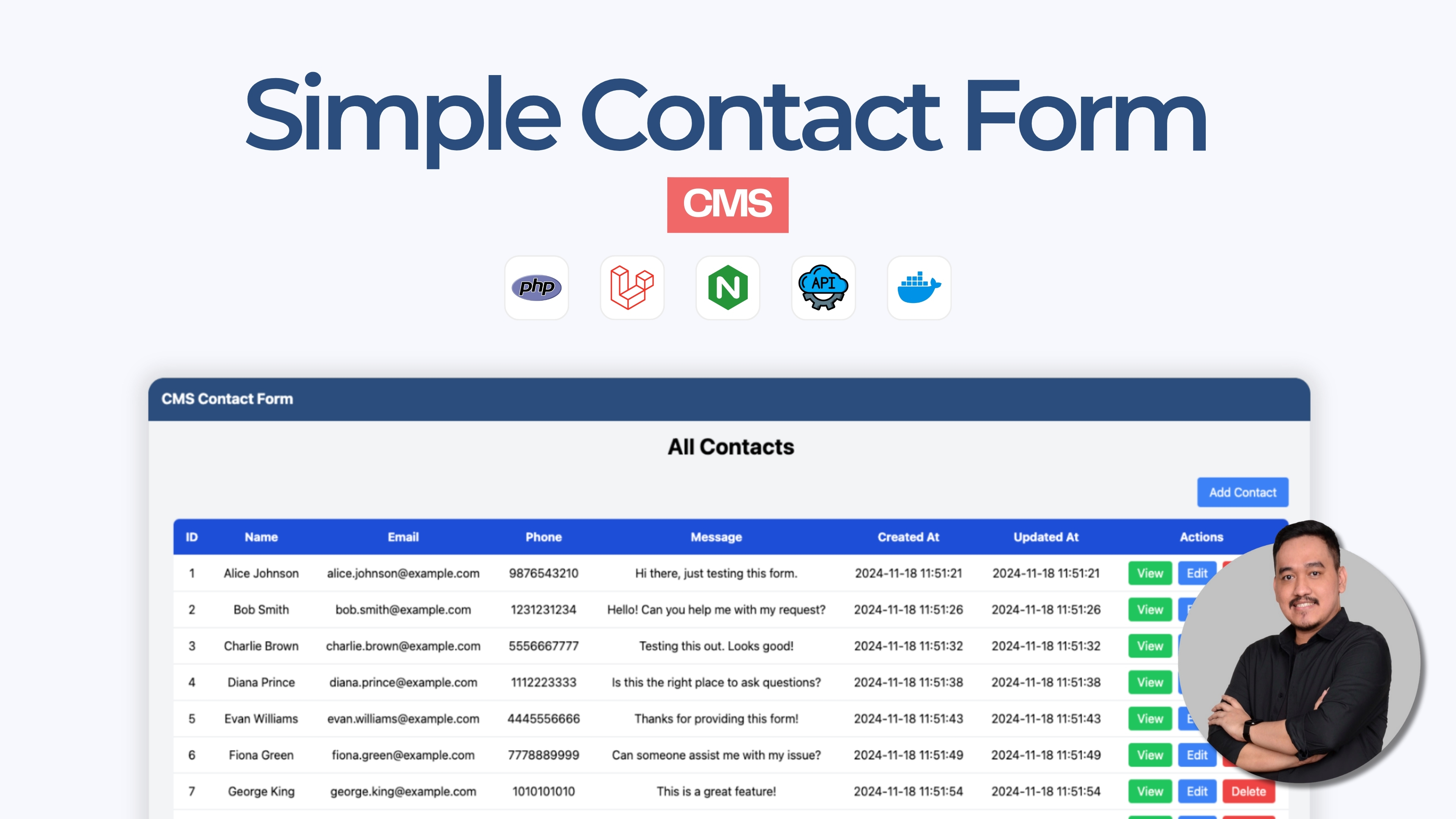
Introduction
This article has a related root article:
Prerequisites
- PHP installed on your system (version 7.3 or higher)
- Composer installed
- Basic knowledge of Laravel and PHP
Step 1: Install Laravel
First, you need to install Laravel globally using Composer if you haven't already.
composer global require laravel/installerEnsure that the Composer global bin directory is in your system's PATH.
Step 2: Create a New Laravel Project
Create a new Laravel project named myapp.
laravel new cms-contact-form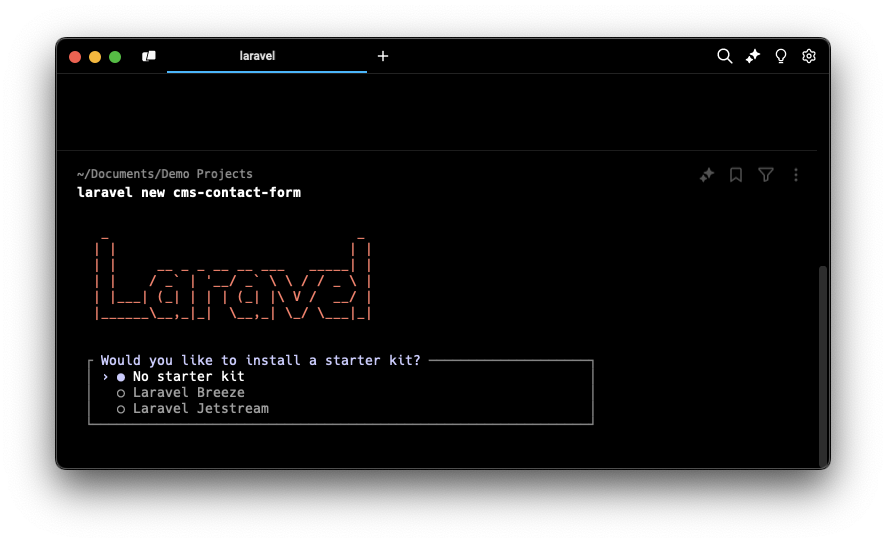
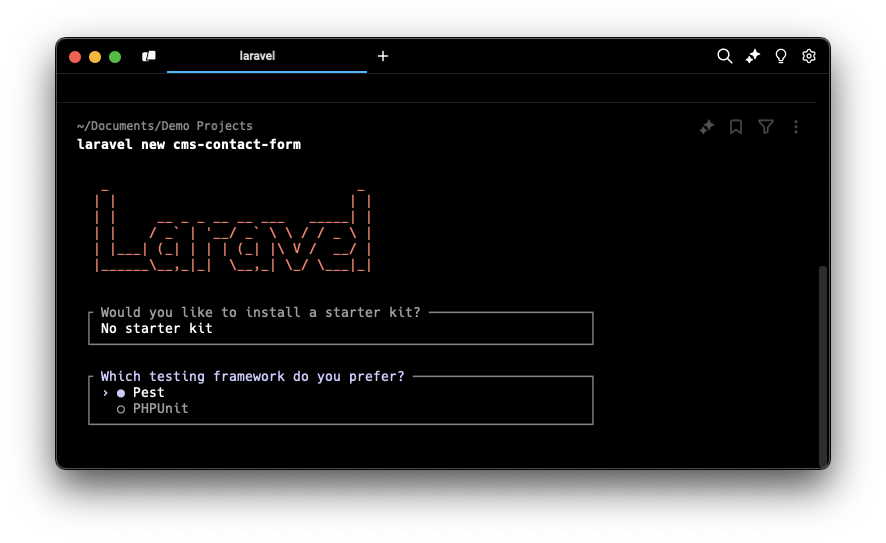
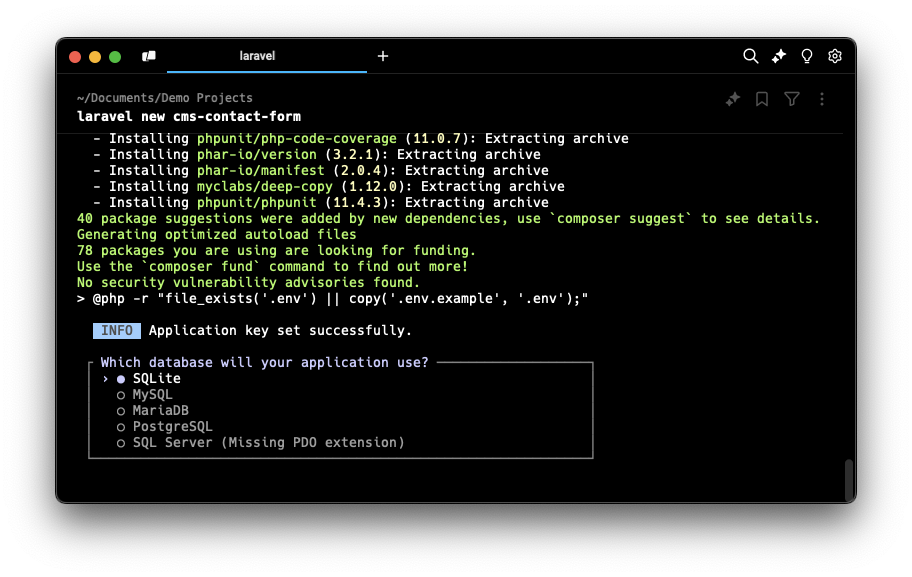
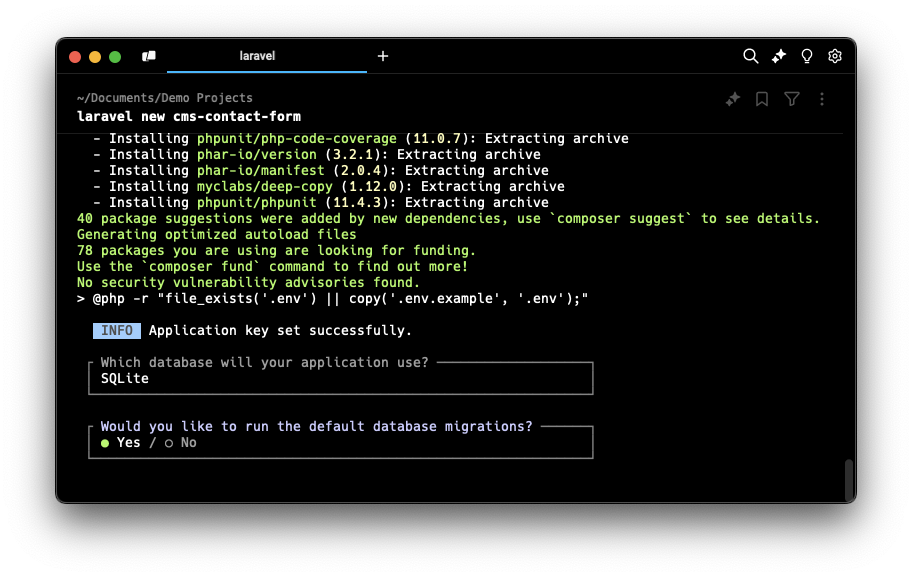
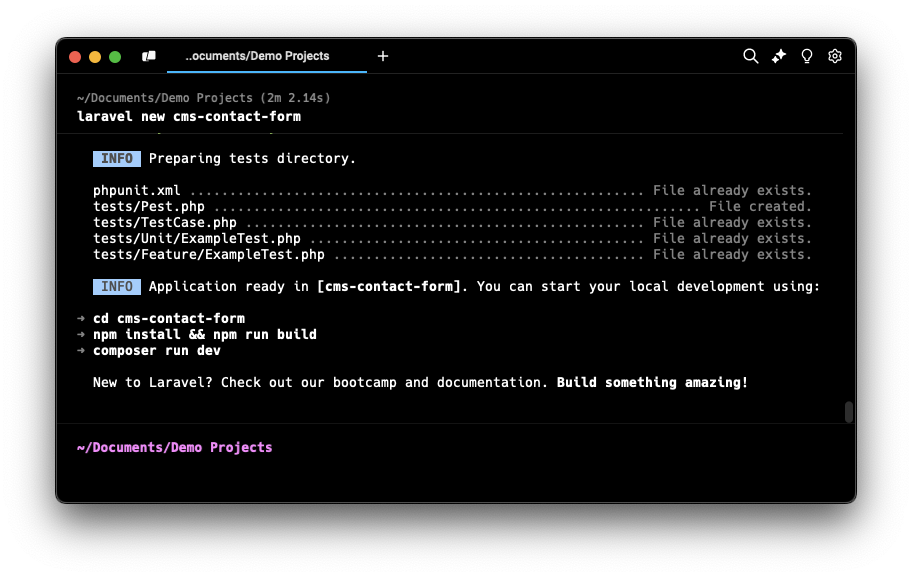
Step 3: Navigate to the Project Directory
cd cms-contact-formStep 4: Update Session Driver
Since this application doesn't use a database and relies only on APIs, we need to update the session driver in the .env file. Change only on SESSION_DRIVER become file.
....

SESSION_DRIVER=file

...
Step 5: Create a Controller
Generate a new controller named ContactController to handle the form submission.
php artisan make:controller ContactControllerThen edit the controller code:
app/Http/Controllers/ContactController.php<?php /** * Author: Tri Wicaksono * Website: https://triwicaksono.com */ namespace App\Http\Controllers; use Illuminate\Http\Request; use App\Services\ContactService; class ContactController extends Controller { protected $contactService; /** * Inject ContactService dependency. * * @param ContactService $contactService */ public function __construct(ContactService $contactService) { $this->contactService = $contactService; } /** * Display a listing of the contacts. * * @return \Illuminate\View\View */ public function index() { // Retrieve all contacts using ContactService $contacts = $this->contactService->getAllContacts(); // Return the view with contact data return view('contacts.index', compact('contacts')); } /** * Show the form for creating a new contact. * * @return \Illuminate\View\View */ public function create() { // Return the view for creating a contact return view('contacts.create'); } /** * Store a newly created contact in the API. * * @param \Illuminate\Http\Request $request * @return \Illuminate\Http\RedirectResponse */ public function store(Request $request) { // Validate request data $validatedData = $request->validate([ 'name' => 'required|max:255', 'email' => 'required|email:rfc,dns', 'phone' => 'required|max:20', 'message' => 'required|max:500', ]); // Create a new contact with validated data $contact = $this->contactService->createContact($validatedData); // Check if contact creation was successful if ($contact) { return redirect()->route('contacts.index') ->with('success', 'Contact created successfully.'); } // Redirect back with error if contact creation failed return back()->withErrors(['error' => 'Failed to create contact.'])->withInput(); } /** * Display the specified contact. * * @param int $id * @return \Illuminate\View\View|\Illuminate\Http\RedirectResponse */ public function show($id) { // Retrieve contact by ID $contact = $this->contactService->getContactById($id); // If contact exists, display it; otherwise, redirect with error if ($contact) { return view('contacts.show', compact('contact')); } return redirect()->route('contacts.index') ->withErrors(['error' => 'Contact not found.']); } /** * Show the form for editing the specified contact. * * @param int $id * @return \Illuminate\View\View|\Illuminate\Http\RedirectResponse */ public function edit($id) { // Retrieve contact by ID for editing $contact = $this->contactService->getContactById($id); // If contact exists, show edit form; otherwise, redirect with error if ($contact) { return view('contacts.edit', compact('contact')); } return redirect()->route('contacts.index') ->withErrors(['error' => 'Contact not found.']); } /** * Update the specified contact in the API. * * @param \Illuminate\Http\Request $request * @param int $id * @return \Illuminate\Http\RedirectResponse */ public function update(Request $request, $id) { // Validate request data $validatedData = $request->validate([ 'name' => 'required|max:255', 'email' => 'required|email:rfc,dns', 'phone' => 'required|max:20', 'message' => 'required|max:500', ]); // Update contact with validated data $contact = $this->contactService->updateContact($id, $validatedData); // Check if update was successful if ($contact) { return redirect()->route('contacts.index') ->with('success', 'Contact updated successfully.'); } // Redirect back with error if update failed return back()->withErrors(['error' => 'Failed to update contact.'])->withInput(); } /** * Remove the specified contact from the API. * * @param int $id * @return \Illuminate\Http\RedirectResponse */ public function destroy($id) { // Attempt to delete contact by ID $success = $this->contactService->deleteContact($id); // Check if deletion was successful if ($success) { return redirect()->route('contacts.index') ->with('success', 'Contact deleted successfully.'); } // Redirect back with error if deletion failed return back()->withErrors(['error' => 'Failed to delete contact.']); } }
Step 6: Create a Service
Generate a new service ContactService to handle the API call.
App/Services/ContactService.php<?php /** * Author: Tri Wicaksono * Website: https://triwicaksono.com */ namespace App\Services; use Illuminate\Support\Facades\Http; use Illuminate\Support\Facades\Log; class ContactService { protected $apiUrl; /** * Initialize the ContactService with the API base URL from config. */ public function __construct() { $this->apiUrl = config('services.contacts_api.base_uri'); } /** * Retrieve all contacts from the API. * * @return array */ public function getAllContacts() { $response = Http::get($this->apiUrl); if ($response->successful() && $response['code'] === 'SUCCESS' && is_array($response['data'])) { return $response['data']; } // Log detailed error information to stderr Log::channel('stderr')->error('Failed to get all contacts.', [ 'api_url' => $this->apiUrl, 'status' => $response->status(), 'body' => $response->body(), 'response_data' => $response->json(), ]); return []; } /** * Retrieve a specific contact by ID from the API. * * @param int $id * @return array|null */ public function getContactById($id) { $response = Http::get("{$this->apiUrl}/{$id}"); if ($response->successful() && $response['code'] === 'SUCCESS' && is_array($response['data'])) { return $response['data']; } // Log detailed error information to stderr Log::channel('stderr')->error('Failed to get contact.', [ 'api_url' => $this->apiUrl, 'status' => $response->status(), 'body' => $response->body(), 'response_data' => $response->json(), ]); return null; } /** * Create a new contact via the API. * * @param array $data * @return array|null */ public function createContact(array $data) { $response = Http::post($this->apiUrl, $data); if ($response->successful() && $response['code'] === 'CREATED' && is_array($response['data'])) { return $response['data']; } // Log detailed error information to stderr Log::channel('stderr')->error('Failed to create contact.', [ 'api_url' => $this->apiUrl, 'status' => $response->status(), 'body' => $response->body(), 'response_data' => $response->json(), ]); return null; } /** * Update an existing contact via the API. * * @param int $id * @param array $data * @return array|null */ public function updateContact($id, array $data) { $response = Http::put("{$this->apiUrl}/{$id}", $data); if ($response->successful() && $response['code'] === 'SUCCESS' && is_array($response['data'])) { return $response['data']; } // Log detailed error information to stderr Log::channel('stderr')->error('Failed to update contact.', [ 'api_url' => $this->apiUrl, 'status' => $response->status(), 'body' => $response->body(), 'response_data' => $response->json(), ]); return null; } /** * Delete a contact by ID via the API. * * @param int $id * @return string|null */ public function deleteContact($id) { $response = Http::delete("{$this->apiUrl}/{$id}"); if ($response->successful() && $response['code'] === 'SUCCESS') { return $response['code']; } // Log detailed error information to stderr Log::channel('stderr')->error('Failed to delete contact.', [ 'api_url' => $this->apiUrl, 'status' => $response->status(), 'body' => $response->body(), 'response_data' => $response->json(), ]); return null; } }
Step 7: Update Config
Add contacts_api.base_uri config key to config/service.php. This required by ContactService to get API base URI.
<?php

return [

    /*
    |--------------------------------------------------------------------------
    | Third Party Services
    |--------------------------------------------------------------------------
    |
    | This file is for storing the credentials for third party services such
    | as Mailgun, Postmark, AWS and more. This file provides the de facto
    | location for this type of information, allowing packages to have
    | a conventional file to locate the various service credentials.
    |
    */

    'postmark' => [
        'token' => env('POSTMARK_TOKEN'),
    ],

    'ses' => [
        'key' => env('AWS_ACCESS_KEY_ID'),
        'secret' => env('AWS_SECRET_ACCESS_KEY'),
        'region' => env('AWS_DEFAULT_REGION', 'us-east-1'),
    ],

    'resend' => [
        'key' => env('RESEND_KEY'),
    ],

    'slack' => [
        'notifications' => [
            'bot_user_oauth_token' => env('SLACK_BOT_USER_OAUTH_TOKEN'),
            'channel' => env('SLACK_BOT_USER_DEFAULT_CHANNEL'),
        ],
    ],

    'contacts_api' => [
        'base_uri' => env('API_CONTACT_FORM_BASE_URI', 'http://localhost:8080/contacts'),
    ],

];
Step 8: Set Up Routes
Open the routes/web.php file and add the following routes:
<?php

/**
 * Author: Tri Wicaksono
 * Website: https://triwicaksono.com
 */

use Illuminate\Support\Facades\Route;
use App\Http\Controllers\ContactController;

// Redirect the root URL to the contacts index page
Route::get('/', function () {
    return redirect()->route('contacts.index');
});

// Define a resource route for the ContactController
// This automatically sets up standard routes for index, create, store, show, edit, update, and destroy actions
Route::resource('contacts', ContactController::class);
Step 9: Create View
View structure like this:
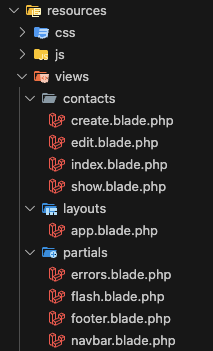
Create a new file and add the following content:
Layouts View
resources/views/layouts/app.blade.php
<!DOCTYPE html>
<html lang="en">
<head>
    <meta charset="UTF-8">
    <title>CMS Contact Form</title>

    <!-- Correct Tailwind CSS CDN Link -->
    <script src="https://cdn.tailwindcss.com"></script>

    <!-- Optional: Include Alpine.js for interactivity if needed -->
    <!-- <script src="//unpkg.com/alpinejs" defer></script> -->
</head>
<body class="bg-gray-100 flex flex-col min-h-screen">

    <!-- Navbar -->
    @include('partials.navbar')

    <!-- Main Content -->
    <main class="flex-1 container mx-auto p-4">
        @yield('content')
    </main>

    <!-- Footer -->
    @include('partials.footer')

    <!-- Scripts -->
    <!-- No need for app.js since we're using CDN for Tailwind -->
</body>
</html>
Partials View
resources/views/partials/errors.blade.php
@if ($errors->any())
    <div class="bg-red-100 border border-red-400 text-red-700 px-4 py-3 rounded mb-4">
        <ul class="list-disc list-inside">
            @foreach ($errors->all() as $error)
                <li>{{ $error }}</li>
            @endforeach
        </ul>
    </div>
@endif

@if ($message = Session::get('error'))
    <div class="bg-red-100 border border-red-400 text-red-700 px-4 py-3 rounded mb-4">
        {{ $message }}
    </div>
@endif
resources/views/partials/flash.blade.php
@if ($message = Session::get('success'))
    <div class="bg-green-100 border border-green-400 text-green-700 px-4 py-3 rounded mb-4">
        {{ $message }}
    </div>
@endif
resources/views/partials/footer.blade.php
<footer class="bg-[#2A4D7D] text-white py-4 mt-auto">
<div class="container mx-auto text-center">
<p>
© 2024 -
<a href="https://triwicaksono.com/?utm_source=labs&utm_medium=demo-projects&utm_campaign=cms-contact-form"
target="_blank"
class="text-blue-400 hover:underline">
Tri Wicaksono
</a>
</p>
</div>
</footer>
resources/views/partials/navbar.blade.php
<nav class="bg-[#2A4D7D] p-4">
    <div class="container mx-auto">
        <a href="{{ route('contacts.index') }}" class="text-white text-xl font-bold">CMS Contact Form</a>
    </div>
</nav>
Contacts View
resources/views/contacts/create.blade.php
@extends('layouts.app')

@section('content')
    <h1 class="text-3xl font-bold mb-6 text-center">Create New Contact</h1>

    @include('partials.errors')

    <form
        action="{{ route('contacts.store') }}"
        method="POST"
        class="max-w-lg mx-auto bg-white p-6 rounded shadow-md"
        onsubmit="return confirm('Are you sure to create this contact?');"
    >
        @csrf
        <div class="mb-4">
            <label class="block mb-2 font-semibold">Name</label>
            <input type="text" name="name" value="{{ old('name') }}" class="w-full border border-gray-300 rounded px-3 py-2 focus:outline-none focus:ring-2 focus:ring-blue-500" required>
        </div>
        <div class="mb-4">
            <label class="block mb-2 font-semibold">Email</label>
            <input type="email" name="email" value="{{ old('email') }}" class="w-full border border-gray-300 rounded px-3 py-2 focus:outline-none focus:ring-2 focus:ring-blue-500" required>
        </div>
        <div class="mb-4">
            <label class="block mb-2 font-semibold">Phone</label>
            <input type="text" name="phone" value="{{ old('phone') }}" class="w-full border border-gray-300 rounded px-3 py-2 focus:outline-none focus:ring-2 focus:ring-blue-500" required>
        </div>
        <div class="mb-4">
            <label class="block mb-2 font-semibold">Message</label>
            <textarea name="message" class="w-full h-32 resize-y border border-gray-300 rounded px-3 py-2 focus:outline-none focus:ring-2 focus:ring-blue-500" required>{{ old('message') }}</textarea>
        </div>
        <div class="flex justify-between">
            <a href="{{ route('contacts.index') }}" class="bg-gray-500 text-white px-4 py-2 rounded hover:bg-gray-600">Cancel</a>
            <button type="submit" class="bg-blue-500 text-white px-4 py-2 rounded hover:bg-blue-600">Submit</button>
        </div>
    </form>
@endsection
resources/views/contacts/edit.blade.php
@extends('layouts.app')

@section('content')
    <h1 class="text-3xl font-bold mb-6 text-center">Edit Contact</h1>

    @include('partials.errors')

    <form
        action="{{ route('contacts.update', $contact['id']) }}"
        method="POST"
        class="max-w-lg mx-auto bg-white p-6 rounded shadow-md"
        onsubmit="return confirm('Are you sure to update this contact?');"
    >
        @csrf
        @method('PUT')
        <div class="mb-4">
            <label class="block mb-2 font-semibold">Name</label>
            <input type="text" name="name" value="{{ old('name', $contact['name']) }}" class="w-full border border-gray-300 rounded px-3 py-2 focus:outline-none focus:ring-2 focus:ring-blue-500" required>
        </div>
        <div class="mb-4">
            <label class="block mb-2 font-semibold">Email</label>
            <input type="email" name="email" value="{{ old('email', $contact['email']) }}" class="w-full border border-gray-300 rounded px-3 py-2 focus:outline-none focus:ring-2 focus:ring-blue-500" required>
        </div>
        <div class="mb-4">
            <label class="block mb-2 font-semibold">Phone</label>
            <input type="text" name="phone" value="{{ old('phone', $contact['phone']) }}" class="w-full border border-gray-300 rounded px-3 py-2 focus:outline-none focus:ring-2 focus:ring-blue-500" required>
        </div>
        <div class="mb-4">
            <label class="block mb-2 font-semibold">Message</label>
            <textarea name="message" class="w-full h-32 resize-y border border-gray-300 rounded px-3 py-2 focus:outline-none focus:ring-2 focus:ring-blue-500" required>{{ old('message', $contact['message']) }}</textarea>
        </div>
        <div class="flex justify-between">
            <a href="{{ route('contacts.index') }}" class="bg-gray-500 text-white px-4 py-2 rounded hover:bg-gray-600">Cancel</a>
            <button type="submit" class="bg-blue-500 text-white px-4 py-2 rounded hover:bg-blue-600">Update</button>
        </div>
    </form>
@endsection
resources/views/contacts/index.blade.php
@extends('layouts.app')

@section('content')
    <h1 class="text-3xl font-bold mb-6 text-center">All Contacts</h1>

    @include('partials.flash')

    @include('partials.errors')

    <div class="flex justify-end mb-4">
        <a href="{{ route('contacts.create') }}" class="bg-blue-500 text-white px-4 py-2 rounded hover:bg-blue-600">Add Contact</a>
    </div>

    <div class="overflow-x-auto">
        <table class="min-w-full bg-white shadow-md rounded-lg overflow-hidden">
            <thead class="bg-blue-700 text-white">
                <tr>
                    <th class="py-3 px-4">ID</th>
                    <th class="py-3 px-4">Name</th>
                    <th class="py-3 px-4">Email</th>
                    <th class="py-3 px-4">Phone</th>
                    <th class="py-3 px-4">Message</th>
                    <th class="py-3 px-4">Created At</th>
                    <th class="py-3 px-4">Updated At</th>
                    <th class="py-3 px-4">Actions</th>
                </tr>
            </thead>
            <tbody>
                @forelse ($contacts as $contact)
                    <tr class="text-center border-t hover:bg-gray-50">
                        <td class="py-2 px-4">{{ $contact['id'] }}</td>
                        <td class="py-2 px-4">{{ $contact['name'] }}</td>
                        <td class="py-2 px-4">{{ $contact['email'] }}</td>
                        <td class="py-2 px-4">{{ $contact['phone'] }}</td>
                        <td class="py-2 px-4">
                            {{ \Illuminate\Support\Str::limit($contact['message'], 50) }}
                            @if (strlen($contact['message']) > 50)
                                <a href="{{ route('contacts.show', $contact['id']) }}" class="text-blue-500 hover:underline">Read More</a>
                            @endif
                        </td>
                        <td class="py-2 px-4">{{ $contact['created_at'] }}</td>
                        <td class="py-2 px-4">{{ $contact['updated_at'] }}</td>
                        <td class="py-2 px-4 flex justify-center space-x-2">
                            <a href="{{ route('contacts.show', $contact['id']) }}" class="bg-green-500 text-white px-3 py-1 rounded hover:bg-green-600">View</a>
                            <a href="{{ route('contacts.edit', $contact['id']) }}" class="bg-blue-500 text-white px-3 py-1 rounded hover:bg-blue-600">Edit</a>
                            <form action="{{ route('contacts.destroy', $contact['id']) }}" method="POST" onsubmit="return confirm('Are you sure to delete this contact?');">
                                @csrf
                                @method('DELETE')
                                <button type="submit" class="bg-red-500 text-white px-3 py-1 rounded hover:bg-red-600">Delete</button>
                            </form>
                        </td>
                    </tr>
                @empty
                    <tr>
                        <td colspan="8" class="py-4 text-center text-gray-500">No contacts found.</td>
                    </tr>
                @endforelse
            </tbody>
        </table>
    </div>
@endsection
resources/views/contacts/show.blade.php
@extends('layouts.app')

@section('content')
    <h1 class="text-3xl font-bold mb-6 text-center">Contact Details</h1>

    <div class="max-w-lg mx-auto bg-white p-6 rounded shadow-md">
        <p class="mb-2"><strong>ID:</strong> {{ $contact['id'] }}</p>
        <p class="mb-2"><strong>Name:</strong> {{ $contact['name'] }}</p>
        <p class="mb-2"><strong>Email:</strong> {{ $contact['email'] }}</p>
        <p class="mb-2"><strong>Phone:</strong> {{ $contact['phone'] }}</p>
        <p class="mb-4"><strong>Message:</strong> {{ $contact['message'] }}</p>
        <p class="mb-2"><strong>Created At:</strong> {{ $contact['created_at'] }}</p>
        <p class="mb-2"><strong>Updated At:</strong> {{ $contact['updated_at'] }}</p>
        <div class="flex justify-end space-x-2">
            <a href="{{ route('contacts.index') }}" class="bg-gray-500 text-white px-4 py-2 rounded hover:bg-gray-600">Back</a>
            <a href="{{ route('contacts.edit', $contact['id']) }}" class="bg-blue-500 text-white px-4 py-2 rounded hover:bg-blue-600">Edit</a>
            <form action="{{ route('contacts.destroy', $contact['id']) }}" method="POST" onsubmit="return confirm('Are you sure you want to delete this contact?');">
                @csrf
                @method('DELETE')
                <button type="submit" class="bg-red-500 text-white px-4 py-2 rounded hover:bg-red-600">Delete</button>
            </form>
        </div>
    </div>
@endsection
Step 10: Run the Laravel Application
Start the Laravel development server.
php artisan serveBy default, the application will be served at http://127.0.0.1:8000.
Step 11: Test the Application
- Open your web browser and navigate to
http://127.0.0.1:8000.
- You should see the contact form CMS page.
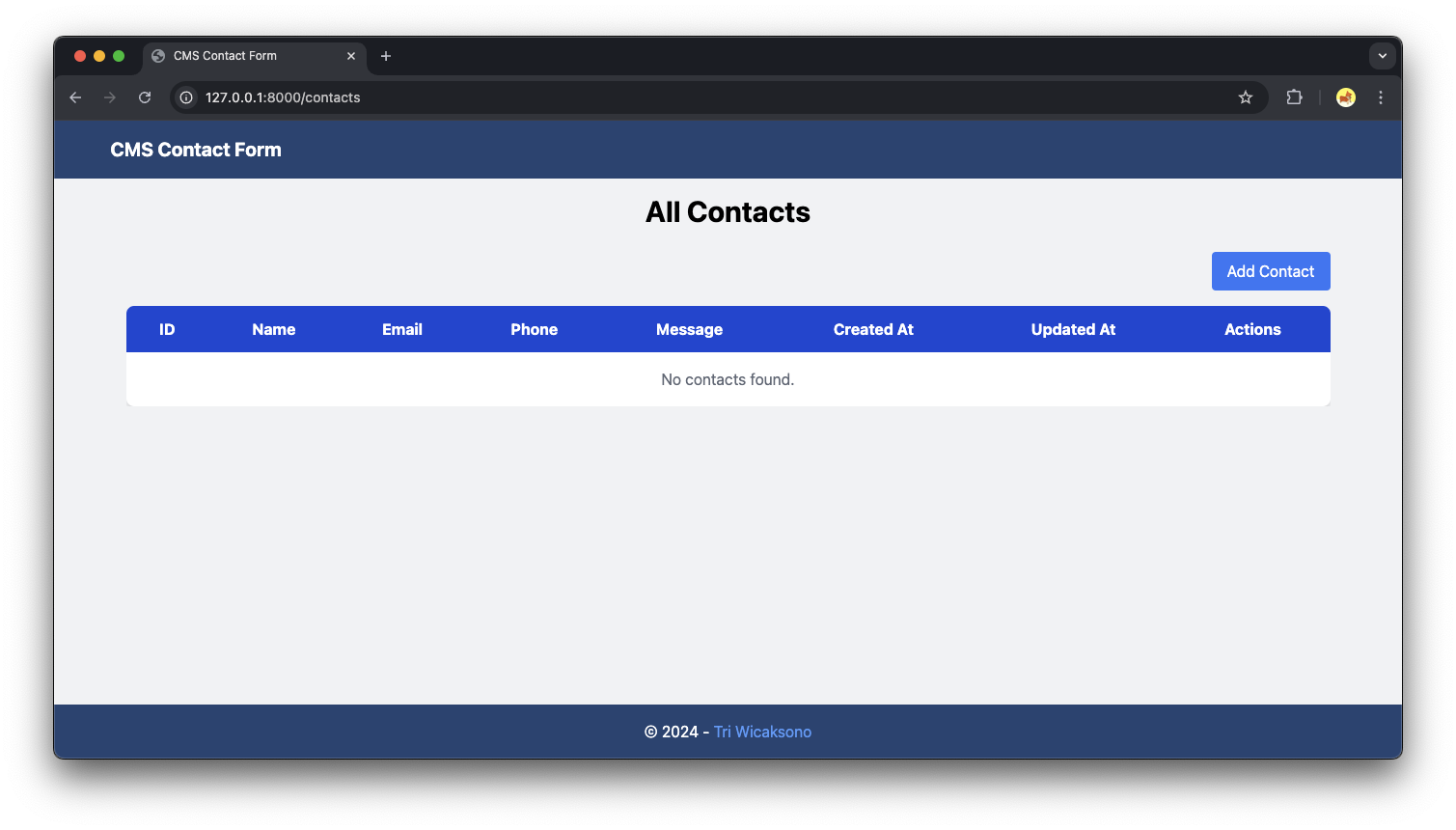
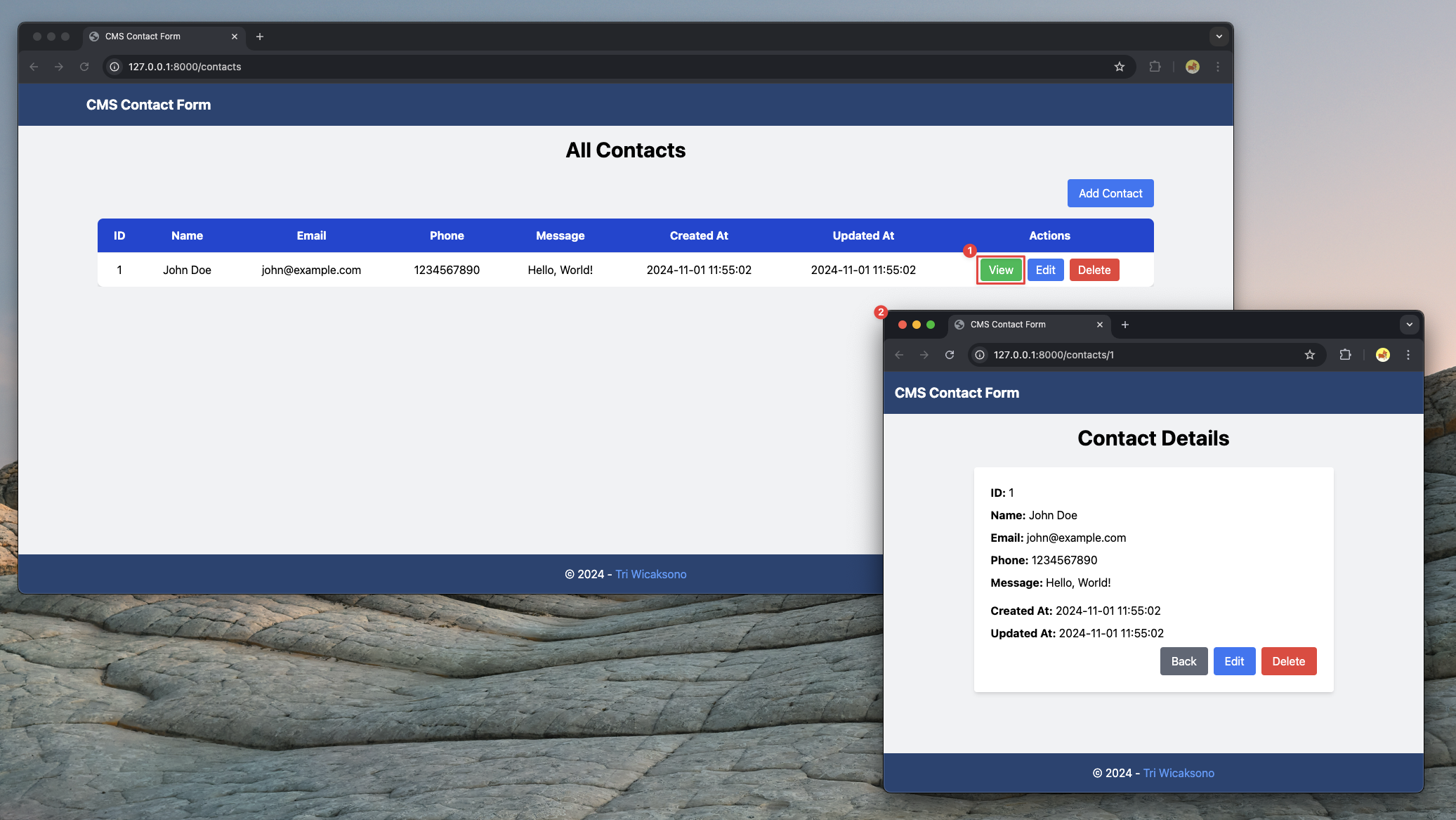
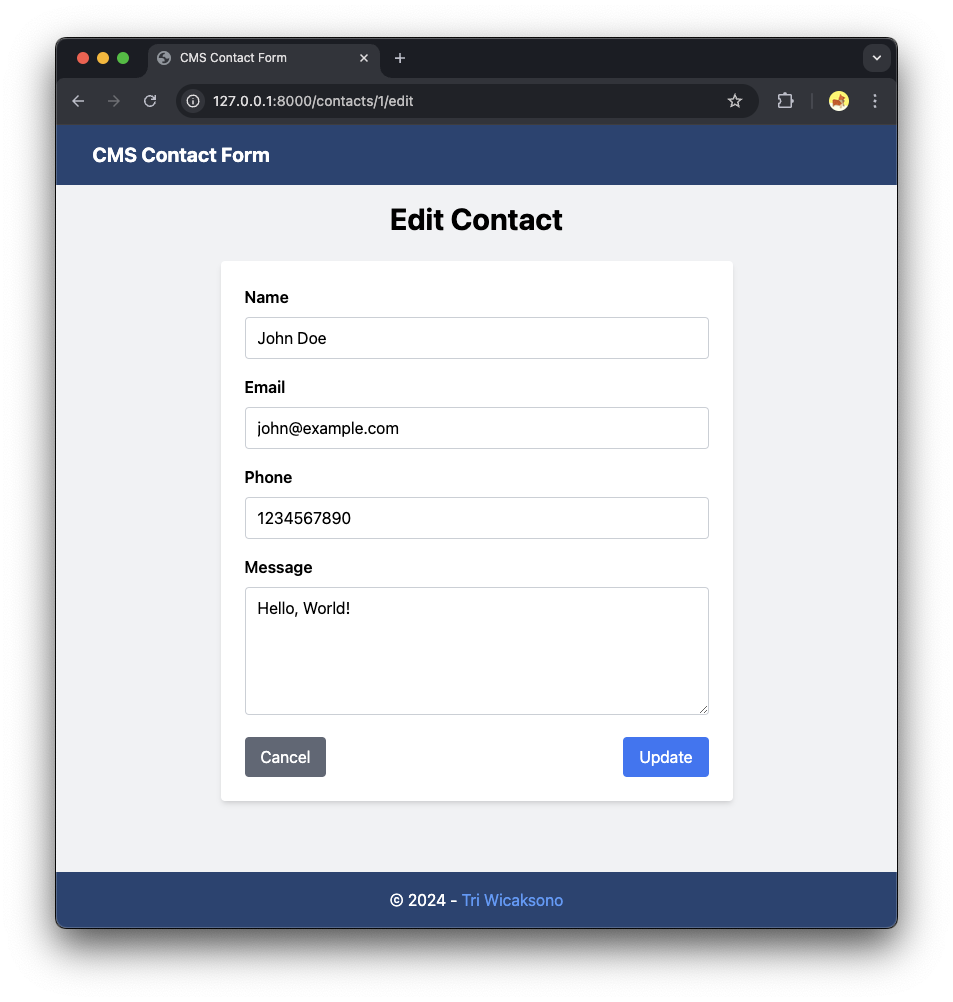
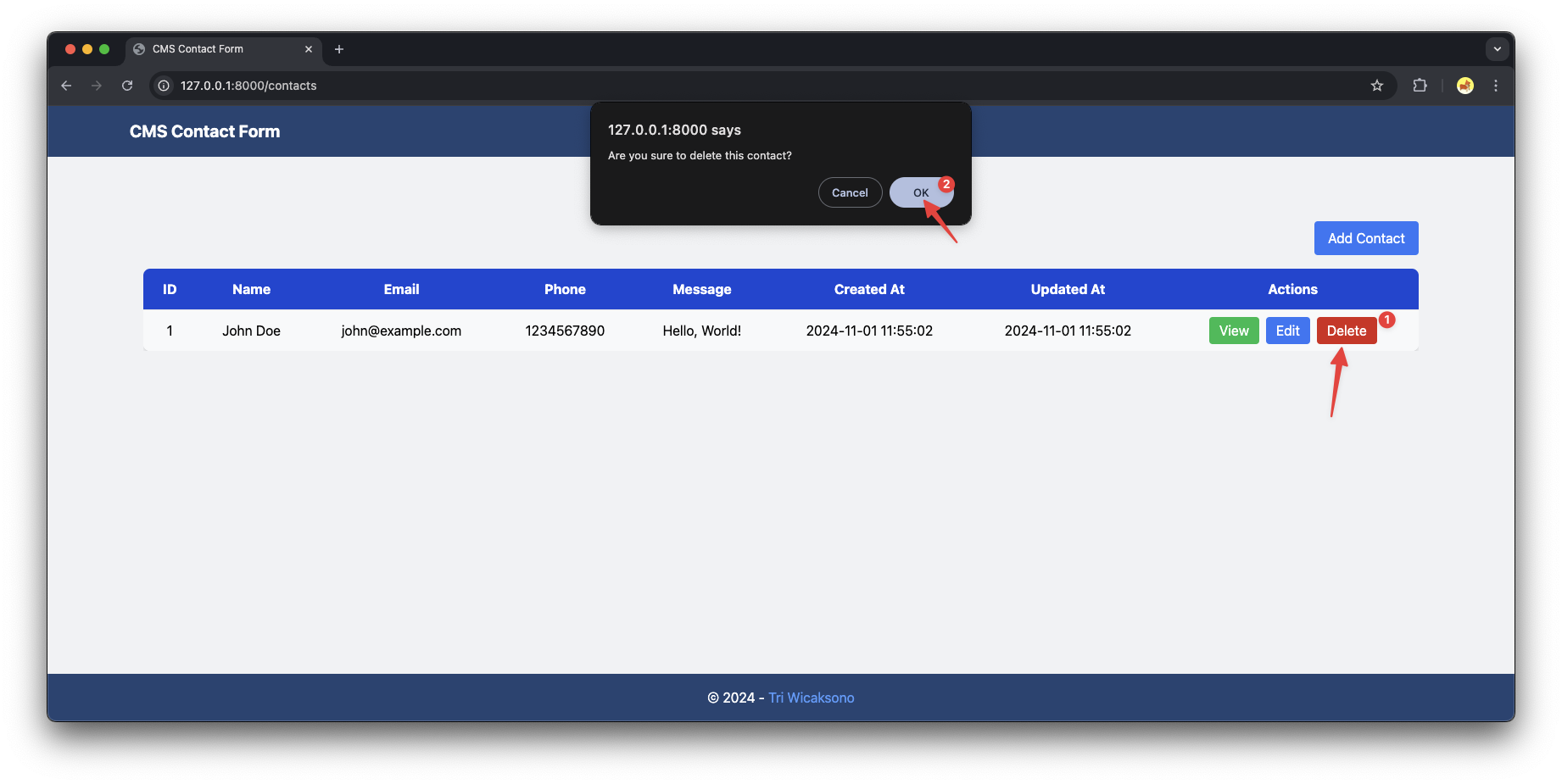
- You can test all functionalities from
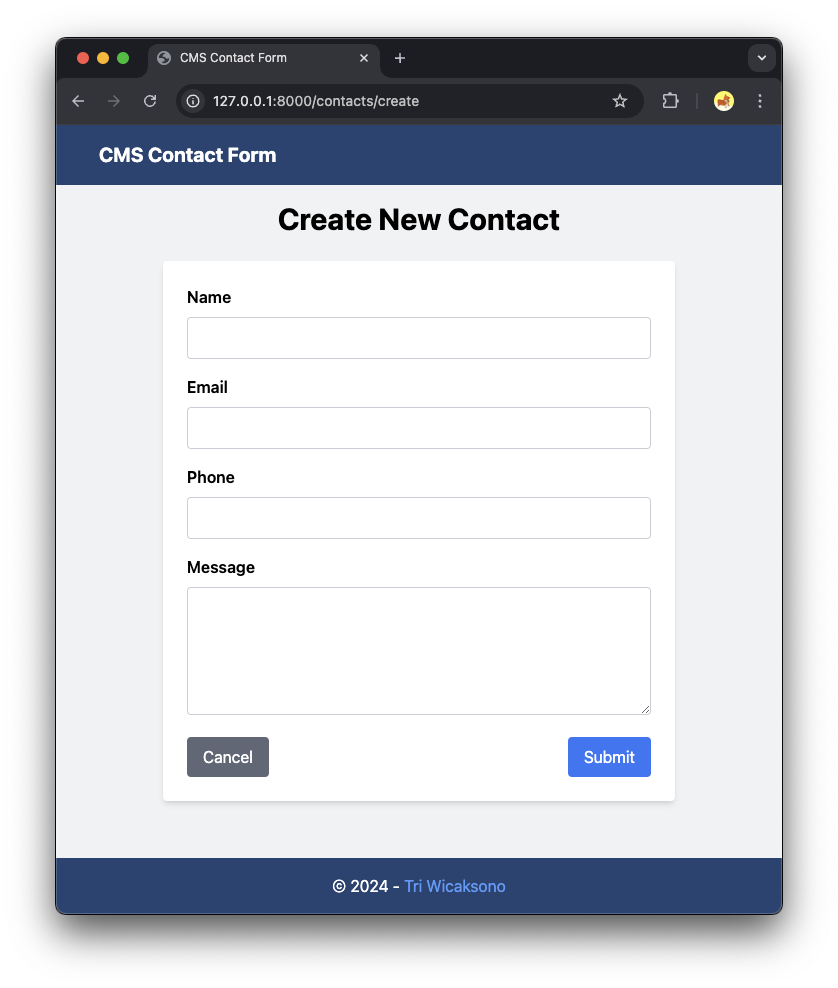
- Add Contact
- View Contact
- Edit Contact
- Delete Contact.
- Add Contact
Troubleshooting
- API Connection Issues: If the application cannot connect to the API, check if the API server is running and accessible from your Laravel application.
Double check with API side refers to Building a Simple Contact Form API Using Golang, Gin Framework, GORM, MariaDB, and Docker
- Port Conflicts: Ensure that there are no port conflicts between the API server and the Laravel development server.
- Cross-Origin Requests: Since the HTTP request is made from the server-side, CORS should not be an issue. If you face any CORS issues, consider configuring the API server to accept requests from your Laravel application's domain and port.
- Dependencies: Ensure all dependencies are installed by running:
composer install
- Cache Issues: If you make changes to routes or configurations and don't see the changes reflected, try clearing the cache:
php artisan route:cache
php artisan config:cache
php artisan view:clear
Feel free to customize and expand upon this basic application to suit your needs!
Step 12: Dockerizing the Application
Containerizing your application ensures consistency across different environments and simplifies deployment. We will using separate containers for Laravel (PHP-FPM) and Nginx to enhances scalability, maintainability, and flexibility.
Why are we using separate containers for Laravel (PHP-FPM) and Nginx when dockerizing this project?
- Separation of Concerns: Running Laravel (PHP-FPM) and Nginx in separate containers isolates the application logic from the web server. This mirrors a production environment where PHP and Nginx are distinct services.
- Scalability: You can scale the PHP-FPM and Nginx containers independently based on load. For example, if your application requires more processing power, you can scale up the PHP-FPM containers without altering the Nginx container.
- Maintainability: Updates or configuration changes to one service won't impact the other. This separation makes it easier to manage, update, and debug each service individually.
- Flexibility: Allows you to swap or upgrade either component (e.g., replace Nginx with Apache) without affecting the Laravel service.
Create Nginx & PHP Configurations
The nginx.conf and local.ini files provide necessary configurations for Nginx and PHP, ensuring that your application runs smoothly with the desired settings within the Docker environment.
docker/nginx/nginx.confserver { listen 80; server_name localhost; root /var/www/html/public; index index.php index.html; location / { try_files $uri $uri/ /index.php?$query_string; } location ~ \.php$ { fastcgi_pass cms-contact-form:9000; fastcgi_index index.php; include fastcgi_params; fastcgi_param SCRIPT_FILENAME $document_root$fastcgi_script_name; fastcgi_param DOCUMENT_ROOT $document_root; } location ~ /\.ht { deny all; } }- Purpose: This is the Nginx configuration file that defines how Nginx should handle HTTP requests.
- Usage:
- Server Configuration: Sets the server block, listening ports, server names, and root directory.
- Routing: Configures how requests are routed, including serving static files and proxying PHP requests to the PHP-FPM container.
- PHP Handling: Specifies that PHP files should be passed to the PHP-FPM service (
fastcgi_pass cms-contact-form:9000;).
docker/php/local.inimemory_limit = 512M upload_max_filesize = 100M post_max_size = 108M max_execution_time = 300- Purpose: This is a custom PHP configuration file to override default PHP settings within the PHP-FPM container.
- Usage:
- PHP Settings: Adjusts PHP directives such as memory limits, upload sizes, execution times, error reporting levels, and timezone settings.
- Environment-Specific Configurations: Allows different settings for development and production environments (e.g., enabling
display_errorsin development).
Dockerfile
Contains instructions to build the Docker image for the Contact Form CMS. It typically includes steps like setting the base image, installing dependencies, copying source code, building the application, and specifying the command to run the application.
Dockerfile# Use the official PHP 8.3 FPM image FROM php:8.3.12-fpm # Set working directory WORKDIR /var/www/html # Install system dependencies RUN apt-get update && apt-get install -y \ git \ curl \ libpng-dev \ libonig-dev \ libxml2-dev \ zip \ unzip \ libzip-dev \ libpq-dev # Clear cache RUN apt-get clean && rm -rf /var/lib/apt/lists/* # Install PHP extensions RUN docker-php-ext-install pdo_mysql mbstring exif pcntl bcmath gd zip # Install Composer COPY --from=composer:latest /usr/bin/composer /usr/bin/composer # Copy existing application directory contents COPY . /var/www/html # Copy .env.example to .env RUN cp .env.example .env # Set permissions for storage and cache directories RUN chown -R www-data:www-data /var/www/html RUN chmod -R 775 /var/www/html # Switch to the www-data user USER www-data # Install Composer dependencies RUN composer install --no-dev --optimize-autoloader # Generate application key RUN php artisan key:generate # Expose port 9000 EXPOSE 9000 # Command to start php-fpm server CMD ["php-fpm"]
.dockerignore
Specifies files and directories to exclude from the Docker build context, optimizing build performance and enhancing security by preventing unnecessary or sensitive files from being included in the Docker image.
.dockerignore# Ignore the .git directory .git .gitignore # Ignore node_modules (if you handle frontend dependencies separately) node_modules # Ignore vendor directory (if you run composer install inside Docker) vendor # Ignore environment files .env .env.*.backup # Ignore build and dependency directories npm-debug.log* yarn-debug.log* yarn-error.log* composer.lock # Ignore IDE and editor directories and files /.vscode /.idea *.sublime-project *.sublime-workspace # Ignore OS-specific files .DS_Store Thumbs.db # Ignore tests and documentation /tests /coverage /phpunit.xml /README.md # Ignore temporary files *.log *.tmp *.bak *.swp # Ignore Docker-specific files if not needed in the image docker-compose.yml Dockerfile
Docker Compose
Orchestrates multi-container Docker applications, managing services like the API and the database seamlessly. It defines how containers should be built, their configurations, networks, and volumes.
docker-compose.yamlservices: # Contact Form CMS Service cms-contact-form: build: . image: cms-contact-form:1.0.0 container_name: cms-contact-form restart: unless-stopped environment: - API_CONTACT_FORM_BASE_URI=http://host.docker.internal:8080/contacts - SESSION_DRIVER=file volumes: - ./docker/php/local.ini:/usr/local/etc/php/conf.d/local.ini depends_on: - nginx-cms-contact-form networks: - contact-form-network-cms # Nginx Web Server for Contact Form CMS nginx-cms-contact-form: image: nginx:alpine container_name: nginx-cms-contact-form restart: unless-stopped ports: - "8081:80" volumes: - ./docker/nginx/nginx.conf:/etc/nginx/conf.d/default.conf networks: - contact-form-network-cms networks: contact-form-network-cms: driver: bridge
Step 13: Building and Running the Application
With the configuration and setup complete, it's time to build and run your application.
Building the Docker Image
Navigate to the project root directory and build the Docker image using Docker Compose.
docker compose buildRun multiple Docker Container
After that run container using this command:
docker compose up -d-d: Runs containers in detached mode.
Verifying Container Status
Ensure all containers are up and running without issues.
docker compose psYou should see application marked as Up.
Verify the Deployment
Open your browser and navigate to http://localhost:8081 to see your deployed Contact Form CMS.
Suggested Next Steps for Improvement
- Implement Authentication: Add user authentication to restrict access to the contact management pages, ensuring only authorized users can view and modify contacts.
- Refactor Validation Logic: Move validation rules into dedicated Form Request classes to keep controllers clean and enhance code maintainability.
- Set Up Email Notifications: Configure the application to send email alerts when new contacts are created or updated.
- Integrate CAPTCHA Verification: Add CAPTCHA to the contact form to prevent spam and automated submissions.
Conclusion
You've now created a Laravel web application with a single index page that consumes an external API. The application features a responsive design with a grey background and handles form submission by sending a POST request to the API endpoint. It displays the response from the API directly on the page.